Scanned documents and drawings guide
How to review scans and engineering drawings: locate text and tables, then verify dimensions and revisions
Scans and engineering drawings put information inside images: notes, title blocks, dimensions, symbols, tables and handwritten marks can all appear together. The goal is not to ask for a one-line verdict that a drawing is “correct.” First locate the text and visible structure, then hand engineering judgments to the qualified people responsible for them.
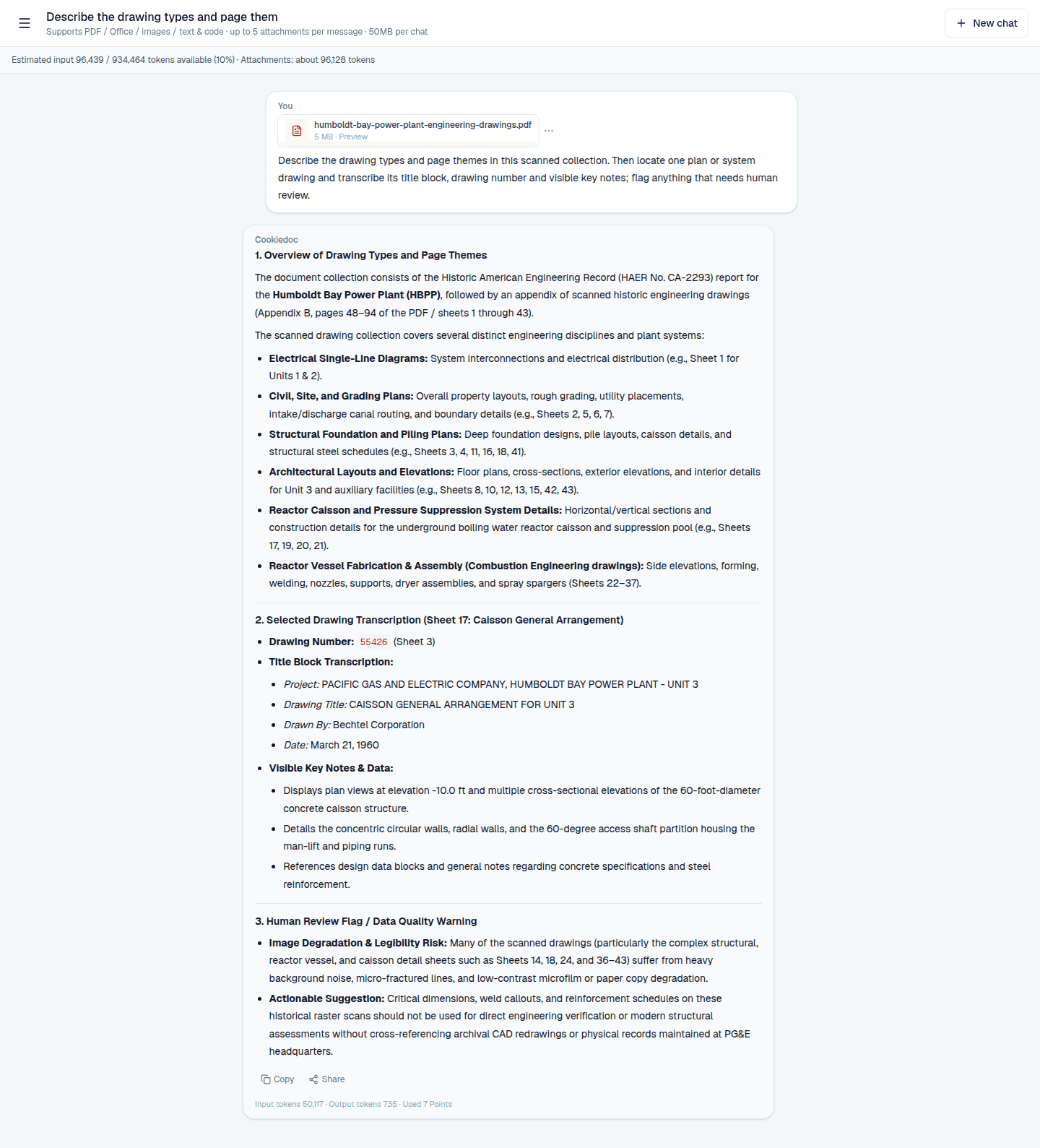
How scans differ from native PDFs
A native PDF usually has selectable text and a stable paragraph structure. A scan must first be interpreted as a page image, so low resolution, skew, shadows, stamps, handwriting and dense line work can all reduce confidence. Tell the system which page or region you want to read and which results need human confirmation.
Engineering drawings add another layer of meaning. A dimension, symbol or revision depends on the legend, title block, related standards and project context. AI can help you find those elements quickly, but it does not replace the designer, contractor, inspector or safety owner.
- Check page direction, clarity and drawing revision first.
- Ask separately about text, tables, dimensions, annotations and symbols.
- Record visible evidence separately from the engineering conclusion.
Before upload: make the visual material readable
Choose a clear, complete and upright scan whenever possible. Do not crop away the title block, legend or page number: these areas often define how a note should be interpreted. When several drawings belong to one conversation, include the project, discipline, revision or date in each filename.
After uploading, ask what pages and topics are present before asking about a small detail. Then ask focused questions such as “what revision is shown in the title block on page 8?” or “what columns appear in the table on page 12?” A global-to-local sequence makes missing pages and wrong versions easier to spot.
- Keep title blocks, legends, page numbers and revision notes.
- Use filenames that show the project, discipline, revision or date.
- Flag blurry, covered or handwritten areas for manual review.
Use three question types for mixed visual documents
The first type is location: list page topics, title-block details, main tables and key notes. The second is extraction: transcribe visible text, table rows or annotations into named fields. The third is comparison: compare two revisions and list additions, removals and changed locations. Keep the page or region with every answer.
For a question about dimensions, materials, installation or safety, separate “what is visible” from “what it means.” Ask for a description of the visible content first. A qualified person should then decide whether it meets the applicable standard and site conditions.
- Locate: page, title block, legend and relevant region.
- Extract: text, table fields, dimensions, IDs and revision notes.
- Compare: visible changes between revisions and their possible impact.
When comparing revisions, separate change from impact
Drawings may record changes through revision clouds, version labels, dates or notes. Ask AI to list observable changes first, then group them by discipline, region or delivery stage. Do not ask it to decide which revision is “correct” without checking the project issue and approval record.
A useful comparison includes old value, new value, page, whether materials or installation may be affected and who must confirm it. That turns a drawing comparison from a quick visual pass into a traceable change record.
- Confirm that the two files have comparable versions, dates and page sets.
- Keep observed changes and inferred impacts in separate columns.
- Cross-check the adopted revision against the project issue record.
Scanned drawing review checklist
- The file is clear, complete and upright, with the title block and legend intact.
- Filenames include project, discipline, revision or date for comparison.
- Blurry, covered, handwritten and complex-symbol areas are marked for review.
- Extracted text keeps page and region context and does not turn an inference into a quote.
- Dimensions, materials, installation and safety judgments are checked by a qualified person.
Scanned documents and drawings FAQ
Can AI reliably understand every engineering drawing?
No. Clarity, layout, symbols, handwriting and professional context all affect the result. Use it for locating and organizing information, then verify key dimensions, standards and safety decisions manually.
Can I compare two drawing revisions?
You can ask for differences in visible text, tables, revision notes and annotations. The project issue and approval process still determine which revision should be used.
Why keep the title block and legend?
They define the scope of dimensions, symbols and notes. Cropping them out removes context that may be necessary to interpret the rest of the drawing.
Make scanned material easier to locate and verify
Upload a clear PDF, Office file or image and start with page, title-block, table and revision questions.